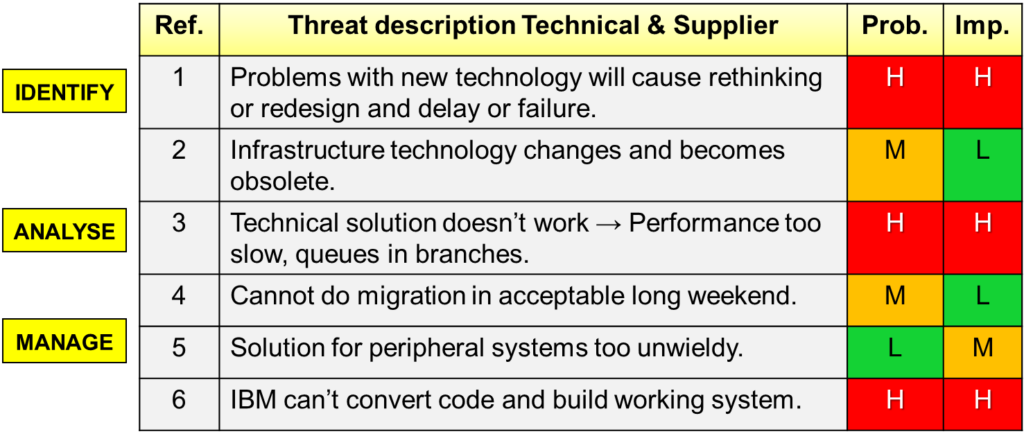
The Risk Management Matrix is an invaluable tool for managing risks in any business or project. It helps you assess and prioritize risks based on their likelihood and impact. Here’s a step-by-step guide to using the matrix effectively:
Step 1: Define Your Risk Categories
Before using the matrix, identify the risks you want to assess. These could range from financial risks to operational, technological, or regulatory risks. Ensure you have a clear understanding of the types of risks your business faces.
Step 2: Set the Likelihood and Impact Scales
The matrix has two axes:
- Likelihood (Probability): How likely is it that the risk will occur? You could use categories like “Rare,” “Unlikely,” “Possible,” “Likely,” and “Almost Certain.”
- Impact (Severity): If the risk occurs, how severe will the consequences be? You could categorize impact as “Minor,” “Moderate,” “Major,” or “Catastrophic.”
Step 3: Plot the Risks on the Matrix
For each risk, determine its probability and impact. Plot the risk on the matrix based on where these two factors intersect. This helps you visualize which risks are the most critical.
Step 4: Prioritize Based on Position
Once your risks are plotted, you can easily identify which ones demand immediate attention. High-likelihood, high-impact risks should be prioritized first, while lower-priority risks can be monitored or mitigated later.
Step 5: Create Action Plans
For high-priority risks (those in the “high likelihood, high impact” quadrant), develop action plans that outline risk mitigation strategies. For lower-priority risks, determine if monitoring is sufficient or if preventative measures should be put in place.
By using the Risk Management Matrix, you’re not just reacting to risks—you’re taking control. This tool helps you stay ahead of potential challenges, so you can focus your energy where it’s needed most. Regularly updating the matrix ensures you’re always in the know, allowing you to adjust your plans and protect your team and projects from surprises.